Link berpercikan bintan ?? Wow !! Bisa ya di halaman web ada benda yang ada di langit yang biru
( ...Bintang kecill... di langit yang biru...Amat banyak menghias angkasa...), penasaran ? mari kan saya tunjukkan !!
1. Masuk ke blogger dengan ID anda
2. Pada dasbor anda, pilih Rancangan
3. Kemudian pilih Edit HTML
4. Centang Expand Template Widget
5. Lalu, cari kode a:visited dengan tekan CTRL + F dan ketik a:visited
6. Maka akan tampil kode berikut:
a:visited {
text-decoration:none;
color: $(link.visited.color);
}
a:hover {
text-decoration:underline;
color: $(link.hover.color);}
.content-outer {
background: $(content.background);
7. Ganti kode yang berlatar kuning di atas dengan kode berikut :
color: #00FFFF; text-transform: uppercase; font-weight: bolder;
font-size: 20px; background-image: url(http://i27.tinypic.com/2626vyh.jpg);
8. Simpan Template dan Cek dengan meletakkan mouse pada link yang ada !! WOW !!
Sumber : http://web.gallerydunia.com/2011/03/cara-membuat-link-menjadi-pelangi.html
Feel Free Doing Little Look and See !!
Tampilkan postingan dengan label Tips n Tricks. Tampilkan semua postingan
Senin, 14 November 2011
Membuat Link Aktif Berpercikan Bintang
Senin, 07 November 2011
Cara Download Games Dari Games.co.id
Hai teman-teman, apakah anda seorang Games-co-id-Mania ? Jika iya, mungkin anda pernah bertanya-tanya, gimana ya cara mendownload game-game dari website cool ini ? Hmm... Kalau mikir terus, bakal bengong, kesambet deh, maka dari itu, akan saya beritahu saja, biar gak usah kesambet, hehe... Gini ni.
( 1 ) Bukak http://www.games.co.id/. Berikut ini dicontohkan dengan Mozilla Firefox 7.0.1.
( 2 ) Lalu pilih game yang anda sukai ( FREE !!! )
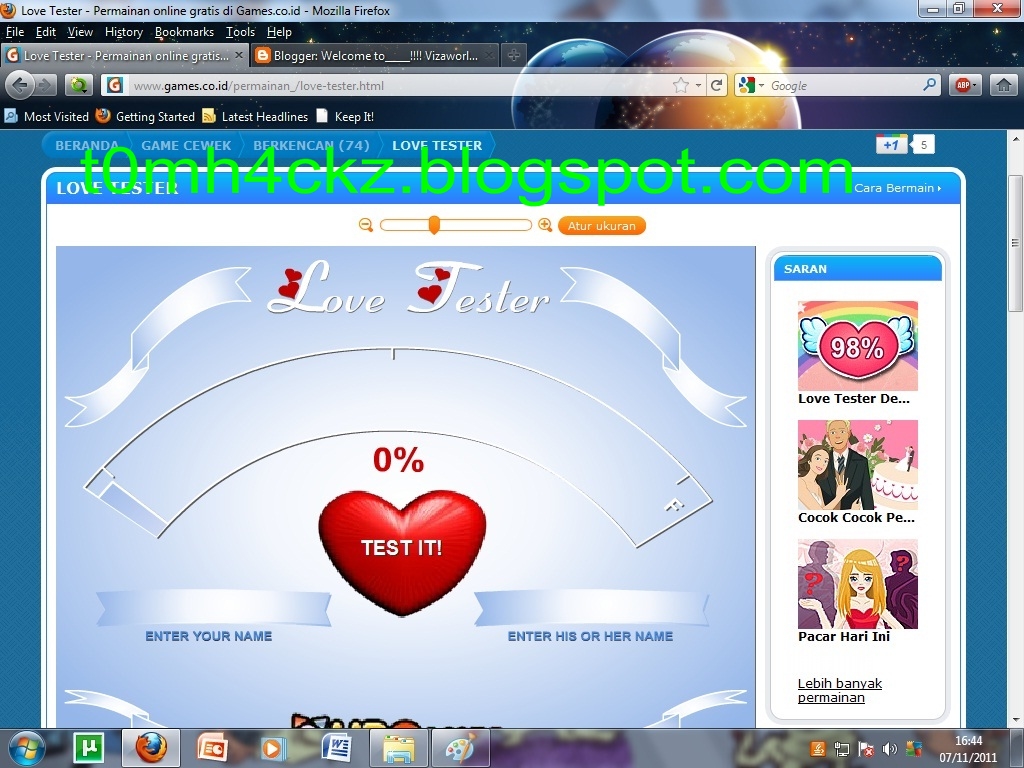
( 3 ) Disini dicontohkan dengan Love Tester. Nah, setelah membuka jendelanya, inilah bagian yang paling menarik...
( 4 ) Klik kanan, pilih View Page Source
( 5 ) Di jendela baru yang muncul, tekan kombinasi CTRL + F, lalu ketik " . swf " * Tanpa Tanda KUTIP !!
( 6 ) Lalu tampilah link ( http//....swf ), nah blok dari http sampai .swf, lalu tekan kombinasi
CTRL + C
( 7 ) Aktifkan kursor di address bar, lalu tekan kombinasi CTRL + V dan tekan ENTER
( 8 ) Setelah jendela game muncul ( SUDAH BENAR-BENAR SELESAI LOADING ), tekan kombinasi CTRL + S, maka jendela baru akan muncul.
( 9 ) Disitu, pilih direktori untuk penyimpanan game berikut, tetapi pastikan di belakang nama file tercantum .swf dengan tanpa tulisan di bagian Save as Type dan Klik Save.
( 10 ) Game anda siap dibuka, dapat dibuka dengan browser, Macromedia Flash, dll. Selamat Mencoba dan Semoga Berhasil !! Dan Bersifat OFFLINE !!!
( 1 ) Bukak http://www.games.co.id/. Berikut ini dicontohkan dengan Mozilla Firefox 7.0.1.
( 2 ) Lalu pilih game yang anda sukai ( FREE !!! )
( 3 ) Disini dicontohkan dengan Love Tester. Nah, setelah membuka jendelanya, inilah bagian yang paling menarik...
( 4 ) Klik kanan, pilih View Page Source
( 5 ) Di jendela baru yang muncul, tekan kombinasi CTRL + F, lalu ketik " . swf " * Tanpa Tanda KUTIP !!
( 6 ) Lalu tampilah link ( http//....swf ), nah blok dari http sampai .swf, lalu tekan kombinasi
CTRL + C
( 7 ) Aktifkan kursor di address bar, lalu tekan kombinasi CTRL + V dan tekan ENTER
( 8 ) Setelah jendela game muncul ( SUDAH BENAR-BENAR SELESAI LOADING ), tekan kombinasi CTRL + S, maka jendela baru akan muncul.
( 9 ) Disitu, pilih direktori untuk penyimpanan game berikut, tetapi pastikan di belakang nama file tercantum .swf dengan tanpa tulisan di bagian Save as Type dan Klik Save.
( 10 ) Game anda siap dibuka, dapat dibuka dengan browser, Macromedia Flash, dll. Selamat Mencoba dan Semoga Berhasil !! Dan Bersifat OFFLINE !!!
Sabtu, 05 November 2011
Tips-Tips Buat Google Adsense Mania
Kalau bicara tentang Google Adsense maka sebenarnya topik ini dapat dikembangkan sangat luas. Google Adsensenya sendiri sebenarnya mudah, tinggal tempel saja kodenya di blog Anda maka kode iklan tersebut akan otomatis berubah menjadi text atau gambar iklan yang bersesuaian dengan content anda, dengan caratan bahasa blog Anda dapat dimengerti oleh Adsense.
Mengapa belajar adsense itu luas? Karena besar kecilnya hasil yang diperoleh pasti tergantung dengan ramai tidaknya pengunjung ke website Anda, harga kata kunci yang dipilih. Bicara tentang blognya sendiri maka jika seseorang belajar Adsense maka dia pun perlu belajar membuat blog, belajar meramaikan websitenya melalui banyak cara publikasi, belajar melakukan riset pasar yang laris yang akan dibidik oleh blognya tersebut. Hal-hal ini dapat dipelajari dengan sangat lengkap di Asian Brain Internet Marketing.
Topik kali ini hanya menekankan bahwa untuk sukses dengan bisnis Google Adsense Anda maka Anda akan perlu belajar banyak hal seperti: Membuat Blog, melakukan riset pasar, belajar publikasi, termasuk juga belajar menulis dalam bahasa inggris tentunya.
Menjalankan Google Adsense Berarti Harus Akrab Dengan Website
Jika Anda menjalankan bisnis periklanan Google Adsense maka berarti Anda akan perlu menjadi akrab dengan website atau blog. Perlu bisa dan lancar membuatnya, membeli website, membuat content website, mempromosikannnya dan so pasti juga merawat website Anda. Akrab dengan website juga berarti akrab juga dengan internet dan komputer atau laptop. Jika seseorang melihat layar komputer lebih dari 15 menit saja sudah pusing maka akan sangat sulit untuk sukses menjalankan bisnis Google Adsense ini.
Ketika Anda belajar membuat website dan bisa membuat website Anda sendiri maka itu sudah selangkah lebih maju untuk memulai bisnis google adsense Anda. Kalau hanya Google Adsensenya sendiri mudah kok, Anda tinggal mendaftar di Google.com/adsense dan ikuti beberapa petunjuknya, benar-benar mudah.
Rajin Menulis Adalah Kunci Sukses Bisnis Google Adsense April 4th, 2010
Karena Google Adsense itu basisnya pada Content maka Rajin Menulis Adalah Kunci Sukses Bisnis Google Adsense. Rajin menulis akan berefek blog anda banyak isinya dan lebih mungkin terindex di Google. Lebih lengkap lagi jika Anda juga rajin menulis di luar blog Anda, artinya mempromosikan blog anda sehingga mendapat banyak link berkualitas dan akhirnya mendapat posisi bagus di Search Engine. Efek dari itu selanjutnya adalah blog Anda yang diisi Google Adsense akan ramai, dan hasil akhirnya adalah Earning Google Adsense Anda yang banyak. Sukses deh :)
Selamat belajar menulis ya, baik di blog Anda sendiri dan juga di blog di luar milik Anda. Menulis untuk Manusia dan menulis untuk search engine secara seimbang tentunya. Yes, menulis bahasa Inggris pastinya.
Bahasa Inggris Untuk Sukses Menjalankan Google Adsense Memang Perlu
Yes saya kira Anda setuju bahwa kemampuan Bahasa Inggris Untuk Sukses Menjalankan Google Adsense Memang Perlu. Walaupun demikian tidak harus lihai amat juga. Prinsipnya kan untuk menjalankan Google Adsense kita perlu menulis dalam bahasa inggris, dan tulisan itu toh tidak harus ditulis sendiri, bisa dibeli kok. Yang penting kita punya naluri bisnis, sehingga membeli dan menjual serta dapat selisih harganya. Right?
Selain itu untuk bahan tulisan di blog Anda yang menjalankan Google Adsense, artikelnya bisa Anda dapatkan dari tempat lain yang mengijinkan Anda mengcopynya, biasanya para penulis tersebut mengisyaratkan agar tetap menyebutkan sumbernya dan tidak menghapus link ke website mereka. Sebaiknya anda memang mengikuti aturan main ini, sebab jika anda melanggarnya berarti kan seperti mengambil dengan paksa atau mencuri. Jika demikian maka misalnya Google Adsense Anda banyak hasilnya, takutnya Ngga Berkah tuh. ya kan? hehe..
Contoh website dimana Anda bisa memperoleh artikel gratis seperti saya maksudkan diatas untuk artikel Google Adsense Anda misalnya disini: ArticleCity.Com. Ada banyak sekali kok, coba saja Anda cari di Google dengan kata kunci Free Articles misalnya.
Di Asian Brain tempat saya sekolah, sangat padat kok pelajaran tentang Google Adsense. Dan Asian Brain juga mengajarkan BISNIS, jadi jika sudah bisa berbisnis sebenarnya kita tak akan kesulitan untuk mendapatkan tulisan dalam bahasa inggris kok. Namanya saja pebisnis, kan haruslah pandai mengatai masalah-masalah termasuk masalah kurang pandai bahasa inggris. Kan bisa sewa penulis. Anda ingin sekolah seperti saya? Silahkan daftar Gratis dulu disini, isi form pendaftarannya ya: Asian Brain
Yes, memang ada baiknya bisa bahasa inggris dong. Ya kan?
Ada loh kursus bahasa inggris di internet, tetapi lebih cenderung pada percakapan, yang bisa Anda ikuti dengan biaya murah. Selain itu Anda juga bisa menjadikannya bisnis internet yang cemerlang. Saya juga ikut, sambil belajar saya juga menghasilkan sangat lumayan dari sini. Ingin kursus? Silahkan disini: Kursus Bahasa Inggris
Beberapa tips saya tentang CARA belajar bahasa inggris yang cepat ada disini: Koleksi Tips Belajar Bahasa Inggris
---------------> Diharapkan Artikel ini bisa membantu anda, terima aksih, SUKSES !!! <----------------
Sumber : http://adsensemu.com/
Mengapa belajar adsense itu luas? Karena besar kecilnya hasil yang diperoleh pasti tergantung dengan ramai tidaknya pengunjung ke website Anda, harga kata kunci yang dipilih. Bicara tentang blognya sendiri maka jika seseorang belajar Adsense maka dia pun perlu belajar membuat blog, belajar meramaikan websitenya melalui banyak cara publikasi, belajar melakukan riset pasar yang laris yang akan dibidik oleh blognya tersebut. Hal-hal ini dapat dipelajari dengan sangat lengkap di Asian Brain Internet Marketing.
Topik kali ini hanya menekankan bahwa untuk sukses dengan bisnis Google Adsense Anda maka Anda akan perlu belajar banyak hal seperti: Membuat Blog, melakukan riset pasar, belajar publikasi, termasuk juga belajar menulis dalam bahasa inggris tentunya.
Menjalankan Google Adsense Berarti Harus Akrab Dengan Website
Jika Anda menjalankan bisnis periklanan Google Adsense maka berarti Anda akan perlu menjadi akrab dengan website atau blog. Perlu bisa dan lancar membuatnya, membeli website, membuat content website, mempromosikannnya dan so pasti juga merawat website Anda. Akrab dengan website juga berarti akrab juga dengan internet dan komputer atau laptop. Jika seseorang melihat layar komputer lebih dari 15 menit saja sudah pusing maka akan sangat sulit untuk sukses menjalankan bisnis Google Adsense ini.Ketika Anda belajar membuat website dan bisa membuat website Anda sendiri maka itu sudah selangkah lebih maju untuk memulai bisnis google adsense Anda. Kalau hanya Google Adsensenya sendiri mudah kok, Anda tinggal mendaftar di Google.com/adsense dan ikuti beberapa petunjuknya, benar-benar mudah.
Rajin Menulis Adalah Kunci Sukses Bisnis Google Adsense April 4th, 2010
Karena Google Adsense itu basisnya pada Content maka Rajin Menulis Adalah Kunci Sukses Bisnis Google Adsense. Rajin menulis akan berefek blog anda banyak isinya dan lebih mungkin terindex di Google. Lebih lengkap lagi jika Anda juga rajin menulis di luar blog Anda, artinya mempromosikan blog anda sehingga mendapat banyak link berkualitas dan akhirnya mendapat posisi bagus di Search Engine. Efek dari itu selanjutnya adalah blog Anda yang diisi Google Adsense akan ramai, dan hasil akhirnya adalah Earning Google Adsense Anda yang banyak. Sukses deh :)
Selamat belajar menulis ya, baik di blog Anda sendiri dan juga di blog di luar milik Anda. Menulis untuk Manusia dan menulis untuk search engine secara seimbang tentunya. Yes, menulis bahasa Inggris pastinya.
Bahasa Inggris Untuk Sukses Menjalankan Google Adsense Memang Perlu
Yes saya kira Anda setuju bahwa kemampuan Bahasa Inggris Untuk Sukses Menjalankan Google Adsense Memang Perlu. Walaupun demikian tidak harus lihai amat juga. Prinsipnya kan untuk menjalankan Google Adsense kita perlu menulis dalam bahasa inggris, dan tulisan itu toh tidak harus ditulis sendiri, bisa dibeli kok. Yang penting kita punya naluri bisnis, sehingga membeli dan menjual serta dapat selisih harganya. Right?
Selain itu untuk bahan tulisan di blog Anda yang menjalankan Google Adsense, artikelnya bisa Anda dapatkan dari tempat lain yang mengijinkan Anda mengcopynya, biasanya para penulis tersebut mengisyaratkan agar tetap menyebutkan sumbernya dan tidak menghapus link ke website mereka. Sebaiknya anda memang mengikuti aturan main ini, sebab jika anda melanggarnya berarti kan seperti mengambil dengan paksa atau mencuri. Jika demikian maka misalnya Google Adsense Anda banyak hasilnya, takutnya Ngga Berkah tuh. ya kan? hehe..
Contoh website dimana Anda bisa memperoleh artikel gratis seperti saya maksudkan diatas untuk artikel Google Adsense Anda misalnya disini: ArticleCity.Com. Ada banyak sekali kok, coba saja Anda cari di Google dengan kata kunci Free Articles misalnya.
Di Asian Brain tempat saya sekolah, sangat padat kok pelajaran tentang Google Adsense. Dan Asian Brain juga mengajarkan BISNIS, jadi jika sudah bisa berbisnis sebenarnya kita tak akan kesulitan untuk mendapatkan tulisan dalam bahasa inggris kok. Namanya saja pebisnis, kan haruslah pandai mengatai masalah-masalah termasuk masalah kurang pandai bahasa inggris. Kan bisa sewa penulis. Anda ingin sekolah seperti saya? Silahkan daftar Gratis dulu disini, isi form pendaftarannya ya: Asian Brain
Yes, memang ada baiknya bisa bahasa inggris dong. Ya kan?
Ada loh kursus bahasa inggris di internet, tetapi lebih cenderung pada percakapan, yang bisa Anda ikuti dengan biaya murah. Selain itu Anda juga bisa menjadikannya bisnis internet yang cemerlang. Saya juga ikut, sambil belajar saya juga menghasilkan sangat lumayan dari sini. Ingin kursus? Silahkan disini: Kursus Bahasa Inggris
Beberapa tips saya tentang CARA belajar bahasa inggris yang cepat ada disini: Koleksi Tips Belajar Bahasa Inggris
---------------> Diharapkan Artikel ini bisa membantu anda, terima aksih, SUKSES !!! <----------------
Sumber : http://adsensemu.com/
Kamis, 03 November 2011
Membuat Link Aktif Berkelap-Kelip Berubah Warna
Setelah blog walking kesana-sini akhirnya kutemukan juga blog tetangga yang memberikan tip's agar link aktif yang disorot berkedap-kedip berubah warna seperti pelangi. Sebelumnya makasih atas infonya yah.
Okay tanpa perlu berlama2 lagi langsung saja kita praktekkan bagaimana cara membuatnya.
Berikut langkah-langkahnya :
1. Loginlah terlebih dahulu di Blogger
2. Pada Tab Tata Letak > Edit HTML .. jangan lupa centang Expand TempLate Widget
lalu cari kode --> </head>, copas kode berikut persis dibawah kode </head>
3. Klik Simpan Template dan refresh blogmu, lihat hasilnya !! Good Luck
Sumber : http://hadi-99.blogspot.com/2010/06/cara-membuat-link-aktif-yang-disorot.html
Okay tanpa perlu berlama2 lagi langsung saja kita praktekkan bagaimana cara membuatnya.
Berikut langkah-langkahnya :
1. Loginlah terlebih dahulu di Blogger
2. Pada Tab Tata Letak > Edit HTML .. jangan lupa centang Expand TempLate Widget
lalu cari kode --> </head>, copas kode berikut persis dibawah kode </head>
<script src='http://sites.google.com/site/ecaknyo/blog/link-pelangi/rainbow.js ' type='text/javascript'/>
3. Klik Simpan Template dan refresh blogmu, lihat hasilnya !! Good Luck
Sumber : http://hadi-99.blogspot.com/2010/06/cara-membuat-link-aktif-yang-disorot.html
Mengganti Icon Kursor Blogger
1. Login blog anda.
2. Menuju menu design.
3. Klik tambahkan widget
4. Pilih HTML/javascript kemudian copy kode dibawah ini kemudian letakan di dadalamnya dan save
Anda juga dapat mengganti icon kursor yang laindengan cara mengganti URL yang berwarna hijau dengan URL icon kursor yang anda miliki.
Contoh:
Atau dapat didapatkan di website-website penyedia icon cursor seperti : http://www.cursors-4u.com/
2. Menuju menu design.
3. Klik tambahkan widget
4. Pilih HTML/javascript kemudian copy kode dibawah ini kemudian letakan di dadalamnya dan save
<style type="text/css">body {cursor:url("http://img90.imageshack.us/img90/5195/cursorbc.png"),default}</style>
Anda juga dapat mengganti icon kursor yang laindengan cara mengganti URL yang berwarna hijau dengan URL icon kursor yang anda miliki.
Contoh:
Atau dapat didapatkan di website-website penyedia icon cursor seperti : http://www.cursors-4u.com/
Sabtu, 23 April 2011
New Way to Download !!
Hey guys, sometimes when we download something, the internet connection can suddenly be broken off. And what if it's happening when we download such a large-sized file...!!?? Geezzz...i can read your mind. You'll definitely pissed off !!! Now, i want to settle the problem like that and give you an answer "how to download with resume capabilities, efficient, and satisfy-maker. So, here is the way. ( Please follow this blog guys :) ).
Yeah, maybe you've already known this way. But, i want to teach the unknown one that's my purpose ( don't think this is for lecturing purpose plz ;) ). It's called Torrent. With this way, there's one who called seeds and peers. Remember, if the torrent has more seeds it's great !! Because seeds is the one who give us pieces of data/files that we want to download. And, how about peers ? They're the one who download the same data/file like we do. But sometimes, they can be useful too ( they can act just like the peers ).
Many programs can be used for opening "torrent" file. But, the great one that i think is " uTorrent ".
It's fast, FREE, customize able, many features included, and many more advantages. Just download it free at http://www.utorrent.com. Alright, I'll give you a tutorial " how to download with it ".
1. Download and Install it !!
2. Search "torrent" file in the internet with search engine ( such as google, etc ). Remember, this is the formula :
< name of the file that you want > torrent
3. Download and open the "torrent" file and choose the directory and see the proof !!
Yeah, maybe you've already known this way. But, i want to teach the unknown one that's my purpose ( don't think this is for lecturing purpose plz ;) ). It's called Torrent. With this way, there's one who called seeds and peers. Remember, if the torrent has more seeds it's great !! Because seeds is the one who give us pieces of data/files that we want to download. And, how about peers ? They're the one who download the same data/file like we do. But sometimes, they can be useful too ( they can act just like the peers ).
Many programs can be used for opening "torrent" file. But, the great one that i think is " uTorrent ".
It's fast, FREE, customize able, many features included, and many more advantages. Just download it free at http://www.utorrent.com. Alright, I'll give you a tutorial " how to download with it ".
1. Download and Install it !!
2. Search "torrent" file in the internet with search engine ( such as google, etc ). Remember, this is the formula :
< name of the file that you want > torrent
3. Download and open the "torrent" file and choose the directory and see the proof !!
Sabtu, 01 Januari 2011
Sulap Pythagoras
Geo datang penuh semangat,
“Paman APIQ, coba bayangkan sebuah bilangan.”
“Ya. Sudah.” jawab Paman APIQ.
“Genap atau ganjil?” tanya Geo.
“Genap.”
“Kuadratkan.”
“Sudah.”
“Tambahkan 4.”
“Sudah.”
“Bagi 4.”
“Sudah.”
“Berapa hasil akhirnya?” tanya Geo.
“17,” jawab Paman APIQ.
“Paman APIQ pasti membayangkan angka 8 ya…!?”
“Betul! Kamu hebat!” kata Paman APIQ.
“Aku juga mau dong…!” teriak Al dan Meti.
Permainan sulap matematika kali ini istimewa menurut Paman APIQ. Sebelumnya permainan sulap matematika banyak memanfaatkan fungsi invers matematika. Tetapi kali ini Geo memanfaatkan segitiga Pythagoras.
Jadi ketika Paman APIQ menyebut angka 17 maka Geo membayangkan segitiga Pythagoras dengan sisi miring 17.
Geo pasti sudah tahu segitiga tersebut adalah 8, 15, 17. Geo tinggal menebak angka pertama Paman APIQ adalah 8 dan benar.
Misal Paman APIQ memilih angka 10.
Genap.
Kuadratkan = 100.
Tambahkan 4 = 104.
Bagi 4 = 26
Maka Geo akan membayangkan segitiga Pytagoras: 26, 24, dan 10.
“Paman APIQ, coba bayangkan sebuah bilangan.”
“Ya. Sudah.” jawab Paman APIQ.
“Genap atau ganjil?” tanya Geo.
“Genap.”
“Kuadratkan.”
“Sudah.”
“Tambahkan 4.”
“Sudah.”
“Bagi 4.”
“Sudah.”
“Berapa hasil akhirnya?” tanya Geo.
“17,” jawab Paman APIQ.
“Paman APIQ pasti membayangkan angka 8 ya…!?”
“Betul! Kamu hebat!” kata Paman APIQ.
“Aku juga mau dong…!” teriak Al dan Meti.
Permainan sulap matematika kali ini istimewa menurut Paman APIQ. Sebelumnya permainan sulap matematika banyak memanfaatkan fungsi invers matematika. Tetapi kali ini Geo memanfaatkan segitiga Pythagoras.
Jadi ketika Paman APIQ menyebut angka 17 maka Geo membayangkan segitiga Pythagoras dengan sisi miring 17.
Geo pasti sudah tahu segitiga tersebut adalah 8, 15, 17. Geo tinggal menebak angka pertama Paman APIQ adalah 8 dan benar.
Misal Paman APIQ memilih angka 10.
Genap.
Kuadratkan = 100.
Tambahkan 4 = 104.
Bagi 4 = 26
Maka Geo akan membayangkan segitiga Pytagoras: 26, 24, dan 10.
Sulap Tanggal Lahir
Si Tim lahir pada tanggal 17 Oktober 1985. Pada suatu hari, Tim mengunjungi pertunjukan sulap di desanya. Di salah satu pertunjukkan sulap, si pesulap memilih si Tim untuk menjadi asisten sulapnya. Dan, Tim pun maju mendekati si pesulap. Si pesulap tampaknya ingin menebak tanggal lahir si Tim. Dan memberikan instruksi sebagai berikut kepada Tim :
* Kalikan tanggal lahir anda dengan 4, simpan hasilnya.
* Tambahkan angka tersebut dengan 13, simpan hasilnya.
* Kalikan angka tersebut dengan 25, simpan hasilnya.
* Kurangi angka tersebut dengan 200, simpan hasilnya.
* Tambahkan bulan lahir anda pada angka tersebut, simpan hasilnya.
* Kalikan angka tersebut dengan 2, simpan hasilnya.
* Kurangi angka tersebut dengan 40, simpan hasilnya.
* Kalikan angka tersebut dengan 50, simpan hasilnya.
* Tambahkan dua digit tahun kelahiran anda pada angka tersebut, simpan hasilnya
Setelah itu, si pesulap meminta hasil operasi itu dan si Tim memberikan angka 181585 kepada si pesulap. Dan, si pesulap berkata. “Abrakadabra.....Tim, tanggal lahirmu adalah 17, bulan 10 tahun 85”. Si Tim berkata, “Benar pak pesulap !!”. Lalu para penonton bertepuk tangan. Plok...plok...plok...plok.
Pertanyaannya, Bagaimana si pesulap dapat mengetahui tanggal lahir si Tim ?
Here’s the secret ( hehehe...sok Inggris ! ).....
Si Tim akan mengoperasikan tanggal lahirnya sesuai dengan keinginan sang pesulap :
- Kalikan tanggal lahir dengan 4. Angka = 17 x 4 = 68
- Tambahkan dengan 13. Angka = 68 + 13 = 81
- Kalikan dengan 25. Angka = 81 x 25 = 2025
- Kurangi dengan 200. Angka = 2025 – 200 = 1825
- Tambahkan bulan lahir. Angka = 1825 + 10 = 1835
- Kalikan dengan 2. Angka = 1835 x 2 = 3670
- Kurangi dengan 40. Angka = 3670 – 40 = 3630
- Kalikan dengan 50. Angka = 3630 x 50 = 181500
- Tambahkan 2 digit tahun lahir. Angka = 181500 + 85 = 181585
Si Tim lalu memberikan angka 181585 ini kepada si pesulap dan si pesulap pun (secara diam-diam) melakukan :
- Mengurangi dengan 10500. Angka = 181585 – 10500 = 171085
- Angka itu lalu dipecah-pecah menjadi 3 bagian, yaitu 17-10-85
Sumber : http://hjaya.wordpress.com/2010/11/08/sulap-tanggal-lahir/
Rabu, 29 Desember 2010
Facebook Emoticons List
There's the facebook emoticons.
smile- :-) :) :] =)
frown - :-( :( :[ =(
tongue - :-P :P :-p :p =P
grin - :-D :D =D
gasp - :-O :O :-o :o
wink - ;-) ;)
glasses - 8-) 8) B-) B)
sunglasses- 8-| 8| B-| B|
grumpy - >:( >:-(
unsure - :/ :-/ :\ :-\
cry - :'(
devil - 3:) 3:-)
angel - O:) O:-)
kiss - :-* :*
heart - <3
kiki - ^_^
squint - -_-
confused - o.O O.o
upset - >:O >:-O >:o >:-o
pacman - :v
curly lips- :3
robot - :|]
Chris Putnam- :putnam:
Shark- (^^^)
Penguin- <(")
42- :42:
Selasa, 28 Desember 2010
List of Keyboard Keys Combination and Functions
Windows system key combinations
- F1: Help
- CTRL+ESC: Open Start menu
- ALT+TAB: Switch between open programs
- ALT+F4: Quit program
- SHIFT+DELETE: Delete item permanently
- Windows Logo+L: Lock the computer (without using CTRL+ALT+DELETE)
Windows program key combinations
- CTRL+C: Copy
- CTRL+X: Cut
- CTRL+V: Paste
- CTRL+Z: Undo
- CTRL+B: Bold
- CTRL+U: Underline
- CTRL+I: Italic
Mouse click/keyboard modifier combinations for shell objects
- SHIFT+right click: Displays a shortcut menu containing alternative commands
- SHIFT+double click: Runs the alternate default command (the second item on the menu)
- ALT+double click: Displays properties
- SHIFT+DELETE: Deletes an item immediately without placing it in the Recycle Bin
General keyboard-only commands
- F1: Starts Windows Help
- F10: Activates menu bar options
- SHIFT+F10 Opens a shortcut menu for the selected item (this is the same as right-clicking an object
- CTRL+ESC: Opens the Start menu (use the ARROW keys to select an item)
- CTRL+ESC or ESC: Selects the Start button (press TAB to select the taskbar, or press SHIFT+F10 for a context menu)
- CTRL+SHIFT+ESC: Opens Windows Task Manager
- ALT+DOWN ARROW: Opens a drop-down list box
- ALT+TAB: Switch to another running program (hold down the ALT key and then press the TAB key to view the task-switching window)
- SHIFT: Press and hold down the SHIFT key while you insert a CD-ROM to bypass the automatic-run feature
- ALT+SPACE: Displays the main window's System menu (from the System menu, you can restore, move, resize, minimize, maximize, or close the window)
- ALT+- (ALT+hyphen): Displays the Multiple Document Interface (MDI) child window's System menu (from the MDI child window's System menu, you can restore, move, resize, minimize, maximize, or close the child window)
- CTRL+TAB: Switch to the next child window of a Multiple Document Interface (MDI) program
- ALT+underlined letter in menu: Opens the menu
- ALT+F4: Closes the current window
- CTRL+F4: Closes the current Multiple Document Interface (MDI) window
- ALT+F6: Switch between multiple windows in the same program (for example, when the Notepad Find dialog box is displayed, ALT+F6 switches between the Find dialog box and the main Notepad window)
Shell objects and general folder/Windows Explorer shortcuts
For a selected object:- F2: Rename object
- F3: Find all files
- CTRL+X: Cut
- CTRL+C: Copy
- CTRL+V: Paste
- SHIFT+DELETE: Delete selection immediately, without moving the item to the Recycle Bin
- ALT+ENTER: Open the properties for the selected object
To copy a file
Press and hold down the CTRL key while you drag the file to another folder.To create a shortcut
Press and hold down CTRL+SHIFT while you drag a file to the desktop or a folder.General folder/shortcut control
- F4: Selects the Go To A Different Folder box and moves down the entries in the box (if the toolbar is active in Windows Explorer)
- F5: Refreshes the current window.
- F6: Moves among panes in Windows Explorer
- CTRL+G: Opens the Go To Folder tool (in Windows 95 Windows Explorer only)
- CTRL+Z: Undo the last command
- CTRL+A: Select all the items in the current window
- BACKSPACE: Switch to the parent folder
- SHIFT+click+Close button: For folders, close the current folder plus all parent folders
Windows Explorer tree control
- Numeric Keypad *: Expands everything under the current selection
- Numeric Keypad +: Expands the current selection
- Numeric Keypad -: Collapses the current selection.
- RIGHT ARROW: Expands the current selection if it is not expanded, otherwise goes to the first child
- LEFT ARROW: Collapses the current selection if it is expanded, otherwise goes to the parent
Properties control
- CTRL+TAB/CTRL+SHIFT+TAB: Move through the property tabs
Accessibility shortcuts
- Press SHIFT five times: Toggles StickyKeys on and off
- Press down and hold the right SHIFT key for eight seconds: Toggles FilterKeys on and off
- Press down and hold the NUM LOCK key for five seconds: Toggles ToggleKeys on and off
- Left ALT+left SHIFT+NUM LOCK: Toggles MouseKeys on and off
- Left ALT+left SHIFT+PRINT SCREEN: Toggles high contrast on and off
Microsoft Natural Keyboard keys
- Windows Logo: Start menu
- Windows Logo+R: Run dialog box
- Windows Logo+M: Minimize all
- SHIFT+Windows Logo+M: Undo minimize all
- Windows Logo+F1: Help
- Windows Logo+E: Windows Explorer
- Windows Logo+F: Find files or folders
- Windows Logo+D: Minimizes all open windows and displays the desktop
- CTRL+Windows Logo+F: Find computer
- CTRL+Windows Logo+TAB: Moves focus from Start, to the Quick Launch toolbar, to the system tray (use RIGHT ARROW or LEFT ARROW to move focus to items on the Quick Launch toolbar and the system tray)
- Windows Logo+TAB: Cycle through taskbar buttons
- Windows Logo+Break: System Properties dialog box
- Application key: Displays a shortcut menu for the selected item
Microsoft Natural Keyboard with IntelliType software installed
- Windows Logo+L: Log off Windows
- Windows Logo+P: Starts Print Manager
- Windows Logo+C: Opens Control Panel
- Windows Logo+V: Starts Clipboard
- Windows Logo+K: Opens Keyboard Properties dialog box
- Windows Logo+I: Opens Mouse Properties dialog box
- Windows Logo+A: Starts Accessibility Options (if installed)
- Windows Logo+SPACEBAR: Displays the list of Microsoft IntelliType shortcut keys
- Windows Logo+S: Toggles CAPS LOCK on and off
Dialog box keyboard commands
- TAB: Move to the next control in the dialog box
- SHIFT+TAB: Move to the previous control in the dialog box
- SPACEBAR: If the current control is a button, this clicks the button. If the current control is a check box, this toggles the check box. If the current control is an option, this selects the option.
- ENTER: Equivalent to clicking the selected button (the button with the outline)
- ESC: Equivalent to clicking the Cancel button
- ALT+underlined letter in dialog box item: Move to the corresponding item
How to Cheat Plants vs Zombies Money and Sun With Cheat Engine[ 100 % Works !!!] 1st Way [ + Download Links ]
First, all you need is :
1. Plant vs Zombies ( http://rapidshare.com/#!download|781l35|229573793|PvsZ_Crk_JR_www.dl4all.com.rar|24014 )
2. Cheat Engine ( http://www.heijnen1.demon.nl/CheatEngine561.exe)
3. Cheat File ( http://www.drivehq.com/file/df.aspx/publish/POKEHACK/plantsvszombies.CT )
Now, follow my instruction, guys !!
1. Open Plant vs Zombies and make it isn't in full screen by deselecting Full Screen in Options and Click OK
2. Now, open cheat engine and click on this button.
3. And, the Process List window will appear. Now, select popcapgame1.exe in Process List window. Then, click Open
4. After that, click File --> Load. And select the downloaded Cheat File.
5. Click on the cheat file and click open
6. And, you'll see this
7. In the money description there's value : 67999 ( this is your Plants vs Zombies money total). Double click on it!! and you will see Value window.
8. Change the value in the Value window to whatever that you want. For example, 99999 then click OK
9. Superfantasticgalastic...!!!!! Your Plants vs Zombies money turned into 999.990 !!!! and DON'T CLOSE CHEAT ENGINE WINDOW !!! Because i'll continue to show you how to cheat sun !!!
Now, i'll show you how to cheat Plants vs Zombies sun !!!
1. Play Plants vs Zombies ( for example, In Adventure ) and in the Cheat engine window, You will see Sunlight value turned into 50 ( total of your sun in the level that you are playing now ).
2. Double click on the Sunlight value. And change the value into whatever that you want. For Example, 999. And click OK.
3. For make sure, play Plants vs Zombies and your suns ( in the level ) will become 999 ( value that you type in the Cheat Engine Value window ( Sunlight ).
Well guys, thank you for reading and please be my follower !!! Regards, Tom Hack'z
1. Plant vs Zombies ( http://rapidshare.com/#!download|781l35|229573793|PvsZ_Crk_JR_www.dl4all.com.rar|24014 )
2. Cheat Engine ( http://www.heijnen1.demon.nl/CheatEngine561.exe)
3. Cheat File ( http://www.drivehq.com/file/df.aspx/publish/POKEHACK/plantsvszombies.CT )
Now, follow my instruction, guys !!
1. Open Plant vs Zombies and make it isn't in full screen by deselecting Full Screen in Options and Click OK
2. Now, open cheat engine and click on this button.
3. And, the Process List window will appear. Now, select popcapgame1.exe in Process List window. Then, click Open
4. After that, click File --> Load. And select the downloaded Cheat File.
5. Click on the cheat file and click open
6. And, you'll see this
7. In the money description there's value : 67999 ( this is your Plants vs Zombies money total). Double click on it!! and you will see Value window.
8. Change the value in the Value window to whatever that you want. For example, 99999 then click OK
9. Superfantasticgalastic...!!!!! Your Plants vs Zombies money turned into 999.990 !!!! and DON'T CLOSE CHEAT ENGINE WINDOW !!! Because i'll continue to show you how to cheat sun !!!
Now, i'll show you how to cheat Plants vs Zombies sun !!!
1. Play Plants vs Zombies ( for example, In Adventure ) and in the Cheat engine window, You will see Sunlight value turned into 50 ( total of your sun in the level that you are playing now ).
2. Double click on the Sunlight value. And change the value into whatever that you want. For Example, 999. And click OK.
3. For make sure, play Plants vs Zombies and your suns ( in the level ) will become 999 ( value that you type in the Cheat Engine Value window ( Sunlight ).
Well guys, thank you for reading and please be my follower !!! Regards, Tom Hack'z
Langganan:
Postingan (Atom)